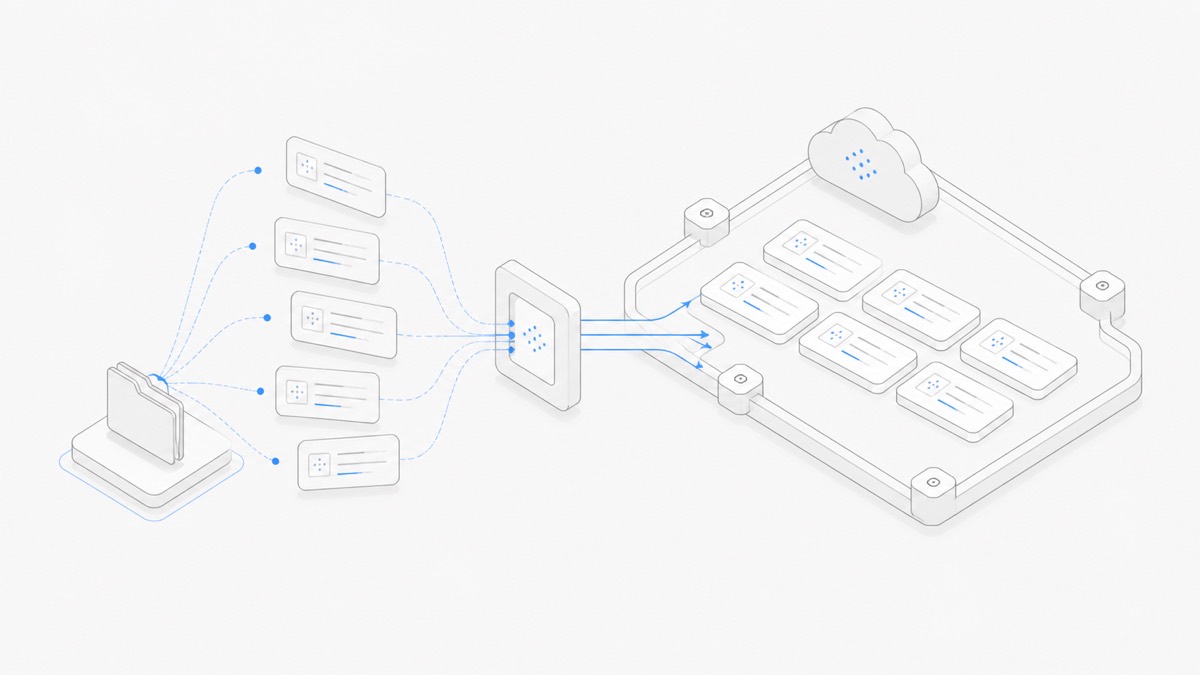
Agent.Space can import selected conversations from local Codex or Claude Code into a cloud Workspace. The import moves the conversation history you approve; it does not upload the local project directory. After import, the conversation continues with the same source Agent—Codex stays Codex, and Claude Code stays Claude Code.
That distinction prevents two common surprises. Importing a conversation is not a file migration, and it is not a conversion from one Agent harness to another. Prepare the destination Workspace files separately, then use the imported history as context for continuing the task.
What is imported and what stays local
The local picker shows recent conversations on your device and lets you choose which ones to import. The picker, local conversation names, and selection process stay on that device. Agent.Space receives the content of only the conversations you select and approve.
The boundary is:
The last row deserves attention. A project directory is not uploaded, but text already present in a selected conversation is still conversation content. Review the sessions you choose if their history contains secrets, sensitive command output, or paths you do not want in the cloud Session.
For the larger relationship between a Session and its Workspace files, read how Agent.Space works.
Before starting the import
Prepare the destination rather than treating import as a one-click migration:
- Open the Agent.Space Workspace where the task should continue.
- Confirm that you are an Owner or Editor. A read-only Viewer cannot import Sessions.
- Add or recreate the project files the cloud task will need.
- Decide whether the local Codex or Claude Code history is the right context to preserve.
- Remove exposed credentials from the local conversation when possible, or choose a safer Session.
The cloud Session will use the destination Workspace's own files. If the local conversation refers to src/app.ts but that file is absent or different in the Workspace, the imported history does not silently repair the mismatch.
Step 1: Choose Codex or Claude Code in the Workspace
Open the import flow from the target Workspace and select the source Agent:
- choose Codex for local Codex conversations;
- choose Claude Code for local Claude Code conversations.
Agent.Space generates a one-time handoff instruction for that source. You do not need to install a separate Skill for this flow. Copy the complete instruction exactly as shown because it includes the destination Workspace and the local handoff behavior.
Step 2: Paste the instruction into the local Agent
Paste the instruction into the local Codex or Claude Code conversation you want to work from. The current conversation will also be available in the local picker, so you can decide whether to include it rather than importing it automatically.
The local Agent runs the handoff flow and returns a picker URL. Keep that process running. The URL works only on the current device and is intentionally short-lived, so open it there rather than forwarding it to another person or machine.
If the link expires or the local command stops, return to the Workspace and run the handoff flow again. Do not try to reconstruct or edit the one-time URL.
Step 3: Select conversations on the local device
The picker lists recent conversations for the selected source Agent. Choose only the Sessions that directly support the cloud task.
A smaller selection is usually easier to use than a complete history dump. Include the Session that contains the decision trail, relevant commands, and current constraints. Skip unrelated experiments, duplicate attempts, and conversations that would make the imported context harder to interpret.
The maximum selection count is controlled by the current product flow, so follow the number shown in the picker instead of relying on an older guide.
At this point, selection remains local. Agent.Space has not received the selected conversation content until you complete authorization in the target Workspace.
Step 4: Review the five-minute authorization
When the picker hands control back to Agent.Space, review the destination Workspace and the number of selected conversations. Each Session receives a single-use authorization that is bound to that Workspace and expires after five minutes.
Approve only when all three details are correct:
- the destination is the Workspace you intended;
- the source Agent matches the selected conversations;
- the count matches your local selection.
If authorization expires, rerun the local handoff. The five-minute window limits reuse; it is not a guarantee that every conversation is safe to import. You still control the content selection.
Step 5: Continue with the same Agent
After import, a Codex conversation continues as Codex and a Claude Code conversation continues as Claude Code. The imported conversation cannot be switched to another Agent harness.
This does not prevent a broader Workspace workflow from using multiple Agents. You can start a separate Session with another supported Agent against the same saved project files, then give it an explicit brief or handoff note. What you cannot do is transform the imported Codex conversation itself into a Claude Code conversation, or vice versa.
When the next task should start as a fresh Claude Code Session instead of continuing an import, use the Claude Code on Agent.Space guide to choose the Workspace context and review boundary deliberately.
That boundary is useful: the imported history retains the semantics of the harness that created it, while cross-Agent collaboration happens through inspectable Workspace state. The guide to coding Agent handoffs for teams explains how to preserve files, decisions, checks, and open risks for the next participant.
Reconnect conversation context to Workspace files
Once import completes, do not immediately ask the Agent to continue a destructive or broad task. First verify that conversation and project state still agree.
Use a short restart prompt such as:
Review the current Workspace files against the imported conversation. Summarize what is still true, identify missing or changed files, and propose the smallest next action. Do not modify files yet.
Then check:
- Are the files referenced in the history present in the Workspace?
- Does the current code match the last state described in the local conversation?
- Were commands or test results tied to a different machine or environment?
- Are there unresolved decisions that need a person to confirm?
- Does the Session require credentials that should be configured separately?
This reconciliation is what turns an imported transcript into a useful continuation. Without it, an Agent can confidently follow context that no longer matches the files.
Security and privacy mistakes to avoid
Assuming “no project files” means “no project information”
Conversation history can contain pasted source code, terminal output, filenames, and local paths. Those items remain part of an imported selected conversation. Review the content, not just the file-upload boundary.
Forwarding the local picker link
The picker URL is designed for the device running the local Agent and expires after a short time. It is not a collaboration link. Team collaboration should happen through explicit Workspace membership.
Importing with read-only access
Only a Workspace Owner or Editor can approve an import. If you are a Viewer, ask the Owner to change the role only when editing and Agent continuation are actually required.
Expecting an Agent conversion
Imported Sessions keep their source Agent. To bring another Agent into the project, create a separate Session and hand off through current files and an explicit brief.
Treating the imported transcript as current truth
Local history describes what happened in another environment. The destination Workspace files are the current operational state. Compare them before making changes.
Post-import verification checklist
An import is ready to use when:
- Only the intended conversations appear in the Workspace.
- Each imported Session opens with the correct source Agent.
- No local project directory was assumed to have moved with it.
- Required files exist in the Workspace and match the task.
- Sensitive content in the selected history is understood and acceptable.
- The first continuation prompt asks the Agent to reconcile history with current files.
For longer-running work, persistent coding Agent Sessions explains which state needs to survive and which processes must be restarted.
Continue one bounded task in the cloud
Conversation import works best as a controlled handoff, not a complete machine migration. Choose a small number of relevant Sessions, approve the correct Workspace, verify its files, and continue with the same Agent before expanding the workflow.
Open Agent.Space, create or choose the destination Workspace, and start with one Codex or Claude Code conversation whose next step you can verify.